Fact-check AI answers right in your browser
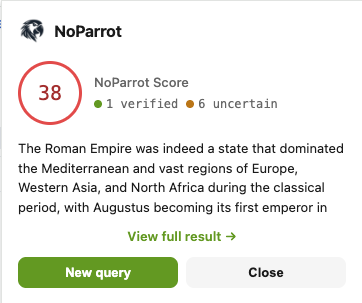
Right-click any AI answer — get a 0–100 NoParrot Score and see which facts are verified, uncertain, or disputed. Every claim scored individually.
Coming soon to Chrome Web Store
How it works
Install the extension
One-click install from the Chrome Web Store. Sign in with your NoParrot account — no separate API key required.
Select any text on the web
Works on ChatGPT, Claude, Gemini, news articles, blog posts — anywhere you read AI-generated or web content.
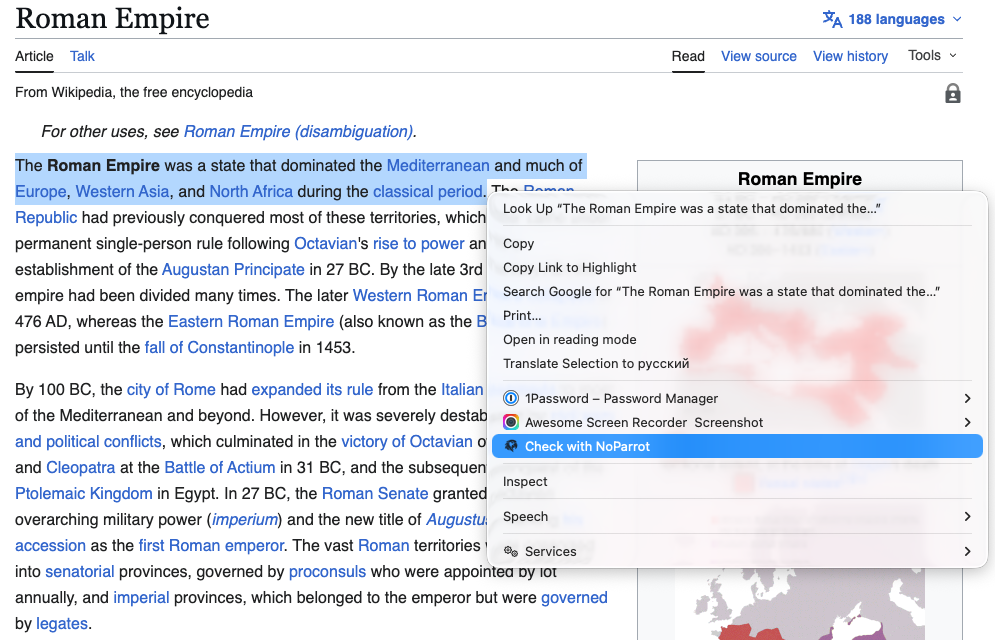
Right-click → Check with NoParrot
We send the text to 4 AI models and extract every claim. You get a 0–100 NoParrot Score with a verified / uncertain / disputed breakdown — open the full result to see every claim color-coded green, yellow, or red.
What you get
4-model consensus
Every check runs against Claude, GPT, Gemini, and Grok. You see agreement on each claim — not one AI's opinion.
Color-coded claim breakdown
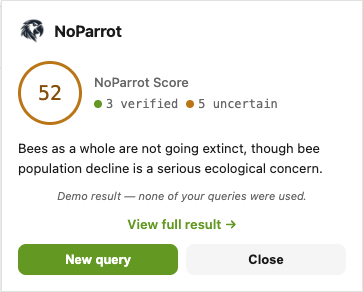
Every check returns a 0–100 NoParrot Score and a green / yellow / red breakdown of verified, uncertain, and disputed claims. Open the full result to see each claim highlighted. No jargon, no PhD required.
Privacy by design
Only text you explicitly select is sent for checking. No browsing history, no URL tracking, no tab sniffing — ever.
Ready to fact-check your browser?
Install the NoParrot extension and get 15 free checks every month.
Coming soon to Chrome Web Store
Questions
Is the extension free?
Yes. 15 checks per month on the Free plan. Upgrade to Pro for 250 checks or Executive for 750. Your extension usage shares the same monthly quota as your noparrot.ai chat.
What data does the extension collect?
Only the text you explicitly select and ask us to check. We do not read page content you haven't highlighted, track browsing history, log URLs, or sniff tabs. See our Privacy Policy for details.
Which browsers are supported?
Chrome and Chromium-based browsers (Edge, Brave, Arc, Opera) at launch. Firefox and Safari are on the roadmap.
Which AI models do you check against?
Claude (Anthropic), GPT (OpenAI), Gemini (Google), and Grok (xAI). We run each check against all four and compare claims across them.
Do I need a separate API key?
No. The extension uses your NoParrot.ai login — one free account, one quota, works everywhere.